Embedded MQTT broker
Enabling the Embedded MQTT Broker
ThingPark Enterprise can be configured to use an embedded MQTT broker.
-
Go to the TPE Configuration Cockpit module, in the "Feature settings" section. Set "MQTT broker" to Enabled, then define the desired username and password.
-
Save the configuration
-
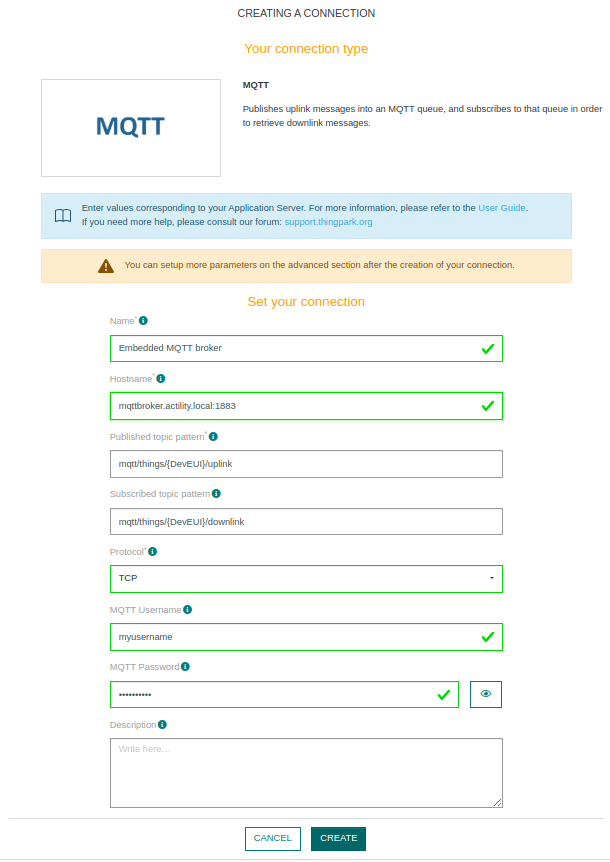
Create an MQTT connection using the following parameters:
- Hostname:
mqttbroker.actility.local:1883 - Protocol: TCP
- MQTT Username: The username configured in Cockpit
- MQTT Password: The password configured in Cockpit
- Hostname:
-
Once enabled, the embedded MQTT broker becomes accessible from outside the TPE node.
Use the external FQDN or IP address of the server to connect. Example using the DEVEUI 0000000000000001:mosquitto_sub -h my.tpe.fqdn -u myusername -P mypassword -t mqtt/things/0000000000000001/uplink
If the embedded MQTT service is restarted, all in-memory data will be lost.
Disabling the embedded MQTT broker
-
Go to the TPE Configuration Cockpit module, in the Feature settings section. Set "MQTT broker" to "Disabled".
-
Save the configuration
-
Remove any MQTT connections configured with the hostname
mqttbroker.actility.local:1883.