Auditing user actions
About user action logs
User action logs (also known as audit trail) are generated for all write operations and login/logout operations performed by user accounts and service accounts associated with the subscription. They allow tracking the following events on all the relevant ThingPark objects:
- Login
- Logout
- Login error
- Logout error
- Create: resource creation, including administrative commands created on existing resources, such as rebooting or upgrading a base station or updating its RF region
- Update: resource update
- Delete: resource deletion
Actions on the following ThingPark objects are tracked:
- Base stations: include RF probes and alarms acknowledgement
- Devices and multicast groups: include relay configuration and alarms acknowledgement
- Connections: except ThingPark X IoT Flow configuration that is not yet available
- Cellular network contexts
- AS transport keys
- User accounts and service accounts
- Network partner: includes TPE license, base station alarms configuration and LoRaWAN configuration
- Subscriber: includes domain groups, domains, device and multicast group alarms configuration and LoRaWAN configuration
The last user action logs can be exported in a CSV file. Each line in the CSV file describes an action performed on a ThingPark object. The maximum number of exported user action logs is 5,000. User action logs older than 6 months cannot be exported. The CSV file contains low-level information extracted from REST API requests. See Control plane API for more details. The following CSV columns are available:
| Column | Definition | Cardinality |
|---|---|---|
| A | Login of the user account (email address) or service account (client ID) responsible for the action | Mandatory |
| B | Type of the ThingPark object targeted by the action: AsTransportKey, BaseStation, CellularNetworkContext, Connection, Device_MulticastGroup, NetworkPartner, Subscriber, UserAccount_ServiceAccount | Optional: only for CREATE, UPDATE, DELETE actions |
| C | Identifier of the ThingPark object targeted by the action. For instance the DevEUI for a device. | Optional: only for CREATE, UPDATE, DELETE actions |
| D | UTC date and time of the action (format is YYYY-MM-DD hh:mm:ss.s) | Mandatory |
| E | Action type: LOGIN, LOGOUT, LOGIN_ERROR, LOGOUT_ERROR, CREATE, UPDATE, DELETE | Mandatory |
| F | Method of the REST API HTTP request: POST, PUT, DELETE | Optional: only for CREATE, UPDATE, DELETE actions |
| G | Request target (URL) of the REST API HTTP request | Optional: only for CREATE, UPDATE, DELETE actions |
| H | HTTP code returned by ThingPark | Optional: only for CREATE, UPDATE, DELETE actions |
| I | ThingPark error code | Optional: only for CREATE, UPDATE, DELETE actions in case of failure |
| J | Content of REST HTTP request (POST and PUT only). Passwords are obfuscated and images are removed. | Optional: only for CREATE, UPDATE actions |
| K | Content Type of REST HTTP request (POST and PUT only) | Optional: only for CREATE, UPDATE actions |
| L | IP address of the client performing the action | Mandatory |
| M | JSON document providing event details | Optional: only for LOGIN, LOGOUT, LOGIN_ERROR, LOGOUT_ERROR actions |
User action logs are accessible only by users having the Administrator role.
Exporting user action logs
-
From the left panel, select Administration, then Control Panel, and go to USER ACTION LOG.
-
(Optional) Set your filters to restrict the exported logs as needed.
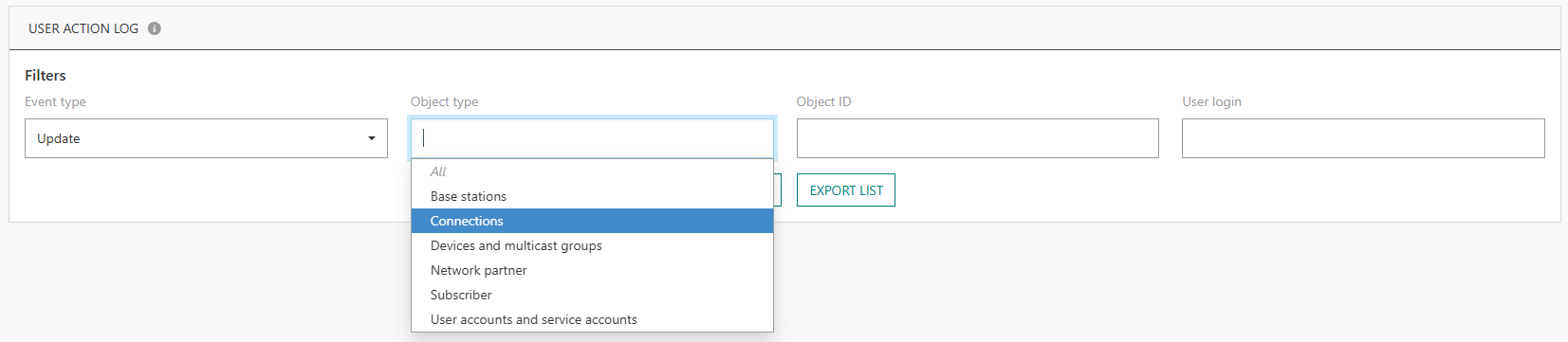
-
Click EXPORT LIST.
-> The last user actions matching your filters are exported in a CSV file. See About user action logs for more details.