About device notifications
The completion status of the following tasks is displayed in the Notification list:
- Unitary device addition and deletion
- Device addition, update and deletion in bulk
- Unitary multicast group addition and deletion
The counter of new notifications (since the last visit of the
notification list) is displayed in a badge over the Notifications icon: 
The notifications are ordered by creation date (newest first), they expire after 7 days. The list is limited to the 100 most recent notifications.
Users having domain restrictions can only view the notifications related to devices and/or multicast groups that match their domain restrictions.
Notification states
Each notification is associated with an icon that represents its current state:
| Status | Icon |
|---|---|
| Pending |  |
| In progress |  |
| Completed (Success) |  |
| Completed (Error) |  |
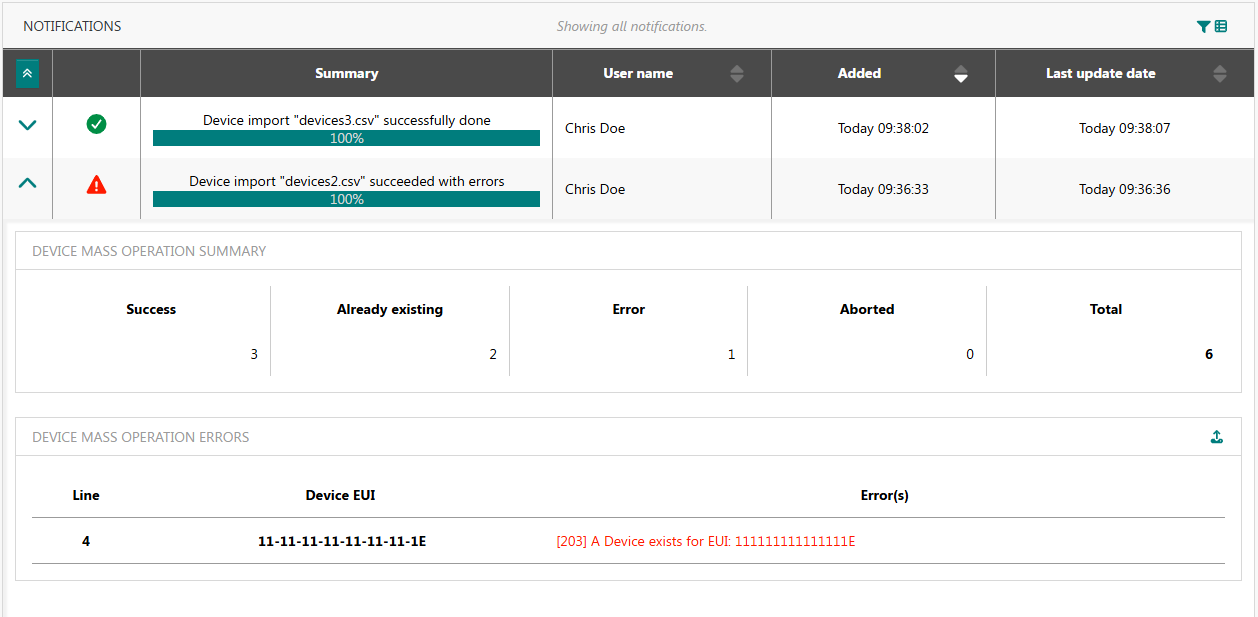
Device mass operation summary
For mass import operations, the summary shows the following counters:
-
Success: number of devices that were successfully processed (added, updated or removed).
-
Already existing: number of device additions that were ignored because they already exist in your subscription.
-
Error: number of devices that were not added, updated or removed because an error occurred. The error cause for each individual device is shown in Device mass operation errors. You must fix these errors before reattempting a new import. A maximum of 500 errors is reported, so additional errors may be reported on the next attempt.
-
Aborted: number of devices that were not processed. These devices were not added, updated or removed, and there is no guarantee that the related lines do not have any errors.
-
Total: total number of devices included in the imported CSV file.