New features
This page cumulates all the new ThingPark Enterprise features brought by the different 8.1.x software releases. See the 8.1 changelog to know more about the split of those features per maintenance release.
The features described in this page are common to SaaS and Self-hosted ThingPark Enterprise products.
Embed virtual device probe in base stations RDTP-3399
Starting release 8.1, base station managers may enable RF probes on their base stations. An RF probe acts as a virtual device embedded in a base station, making the BS act as a device and send periodic uplink frames that are received by surrounding base stations.
The goal of these uplink frames is to test the RF quality of the LoRaWAN network and detect any potential RF disfunction on either the transmitting or the receiving base station(s). The deterministic nature of the RF probe traffic makes it easier to identify radio issues without being impacted by the randomness of the LoRaWAN traffic generated by real devices.
To learn more, see Using RF probes.
More details
Key customer benefits
Thanks to this feature, base station managers can proactively check the RF transmission/reception quality of their LoRaWAN network without deploying physical RF probes:
- Detect RF problems, either on the transmitting or the receiving base station
- Assess & improve network geolocation accuracy
- In-depth network troubleshooting
Feature activation
This feature is deactivated by default.
To activate RF probe on a given base station, go to the base station's detailed page, then RF probe tab then click ENABLE RF PROBE.
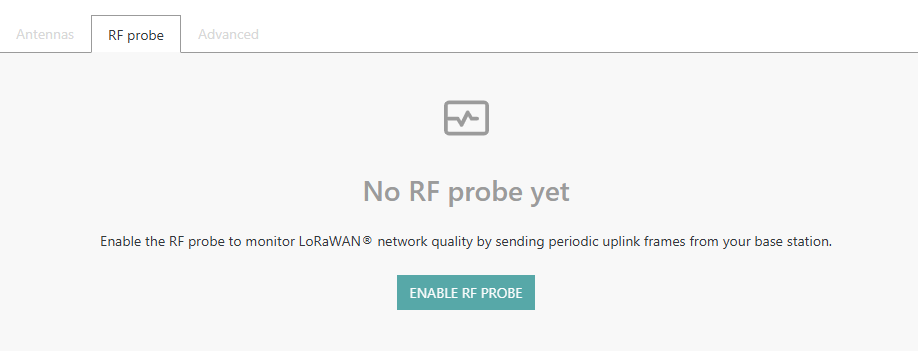
Once activated, the base station manager can associate the RF probe with one or several Connections where uplink packets should be sent to external Application Servers.
Feature limitations
This feature is supported only for base stations using ThingPark LRR packet forwarder (LRR version 2.8.36 or higher). It is not supported by Basics Station packet forwarder.
User action logs (audit trail) RDTP-15326 RDTP-24685
User action logs (also known as audit trail) are generated for all write operations and login/logout operations performed by user accounts and service accounts associated with the subscription. They allow tracking the following actions on all the relevant ThingPark resources:
- Login/logout, including errors
- Resource creation, including administrative commands created on existing resources, such as rebooting or upgrading a base station or updating its RF Region
- Resource update
- Resource deletion
A resource may be a Device, a Base Station, a Connection, a Multicast Group, a Subscription Configuration (for example a Domain), a User Account or a Service Account. The exact nature of the creation/update action is described in the httpRequestContent column of the exported csv file.
User accounts are identified by their email address, whereas Service accounts are identified by their Client ID.
User action logs are accessible only by users having the Administrator role. They can be directly downloaded from the user interface, under the Administration menu.
More details
Key customer benefits
This feature enhances both the security and the operability of ThingPark Enterprise.
-
Security & Compliance
- Track user behavior: Helps detect unauthorized access or suspicious activity.
- Supports compliance: Meets regulatory requirements (e.g., GDPR, HIPAA, ISO 27001).
- Accountability: Clearly attributes actions to specific users or devices.
-
Operational Transparency
- Clear history of changes: See who did what, when, and how — across devices or systems.
- Debugging & troubleshooting: Simplifies root cause analysis when issues arise.
- Reduces downtime: Faster diagnosis of system failures or misconfigurations.
-
Product Improvement & Support
- Better customer support: Logs help replicate and resolve user-reported issues.
- Data integrity assurance: Logs can show the system behaved correctly in key scenarios.
Feature activation
This feature is automatically available in release 8.1.
To export the user action logs from the user interface, click Administration from the left menu, then Control Panel, then go to USER ACTION LOG widget. Optionally set your filters to restrict the exported logs as needed.
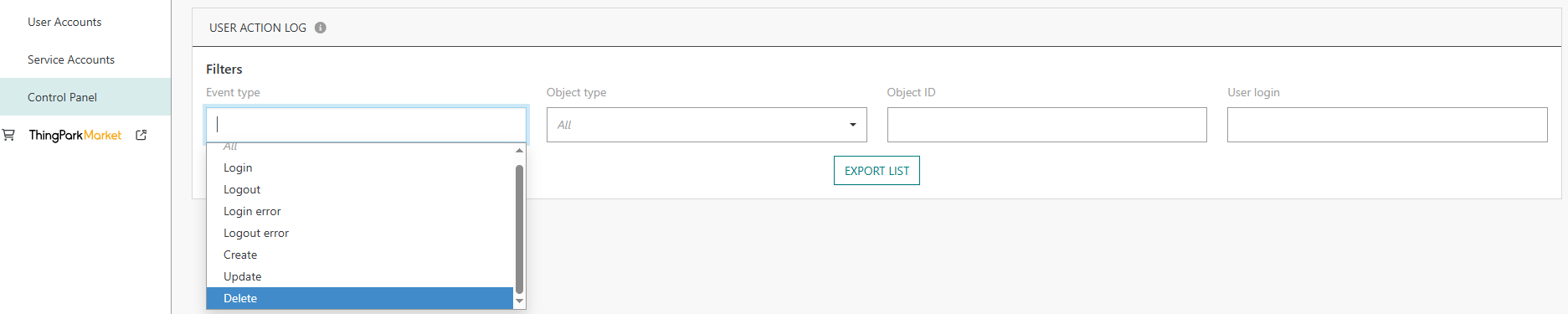
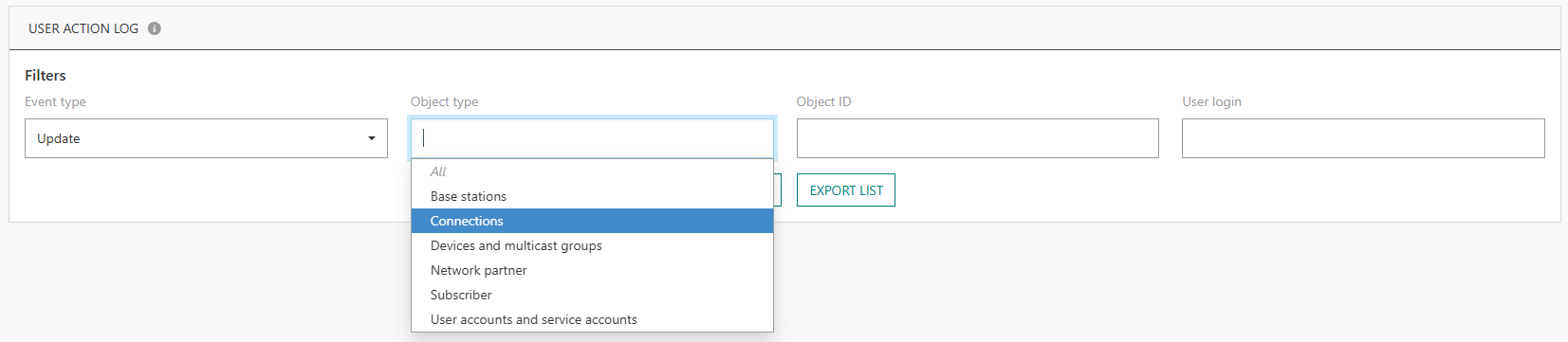
Feature limitations
The following actions are not logged in the current release:
- Write operations on TPX IoT-Flow resources
- Token creation via the legacy DX-ADMIN API
UI/UX enhancements of the Device's Last 10 packets widget RDTP-19954 RDTP-24390 RDTP-13714
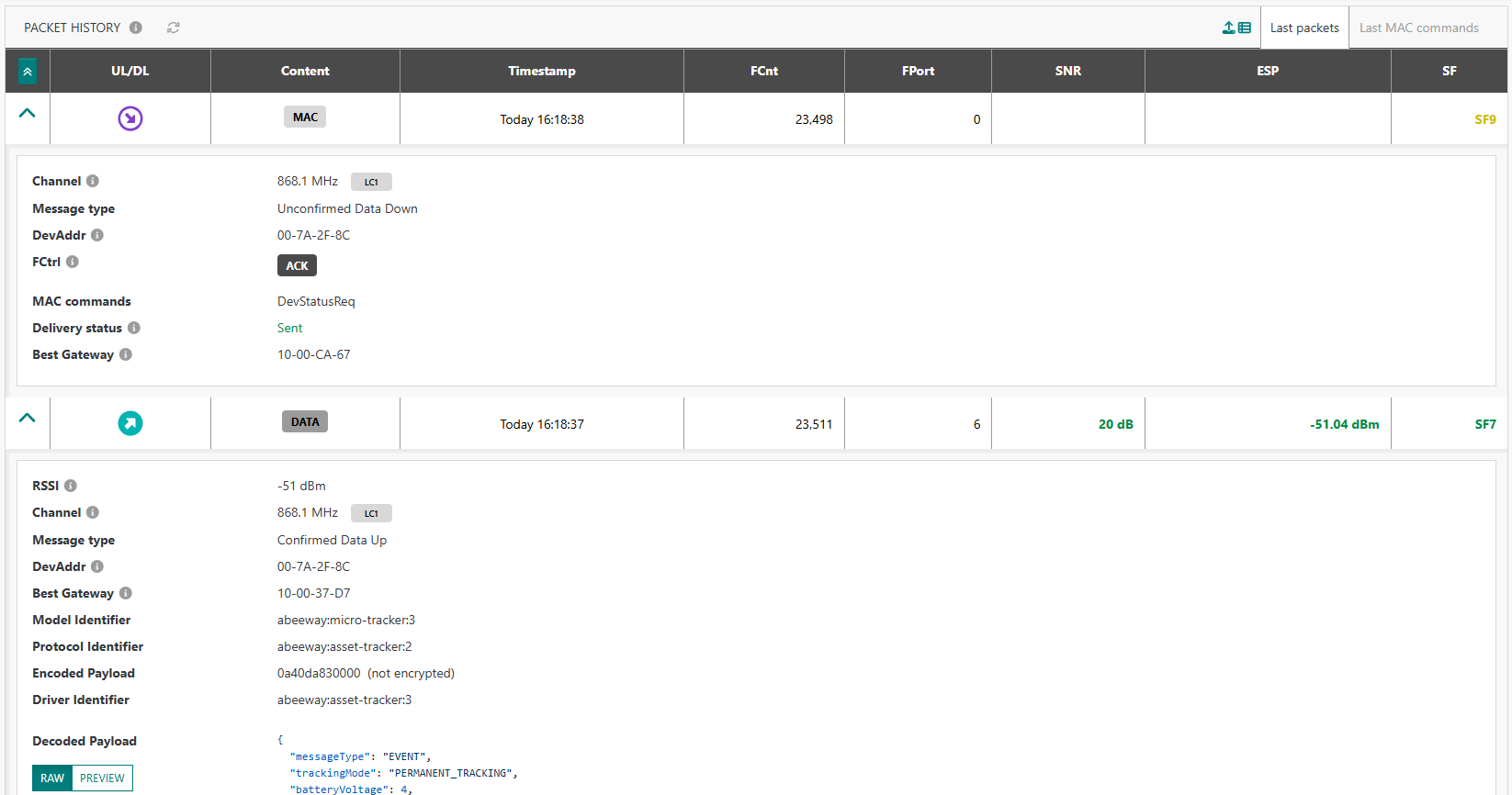
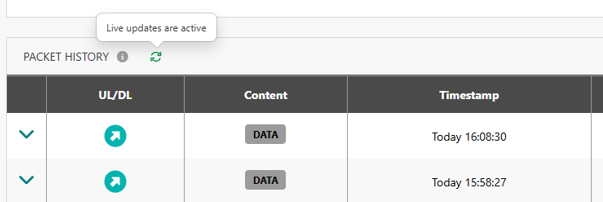
The "Last 10 packets" widget, available in the detailed page of each device, is significantly enhanced in release 8.1. It is now called Packet History.
-
The last 10 MAC commands become accessible in this widget, even if they are not part of the most-recent 10 packets. They are displayed in decoded format.

-
The MAC header of each packet is displayed in decoded format, allowing to easily check the ACK and ADR flags (among others). Additional details about each packet are also available such as the logical channel, RF frequency and the downlink delivery status.
-
Live updates with auto-refresh every 10 seconds, removing the need for manual refresh.
-
Clicking Show more directly sends the user to WLogger with the right DevEUI filter.
More details
Enrich the base station list with the RF Region of each BS RDTP-23646
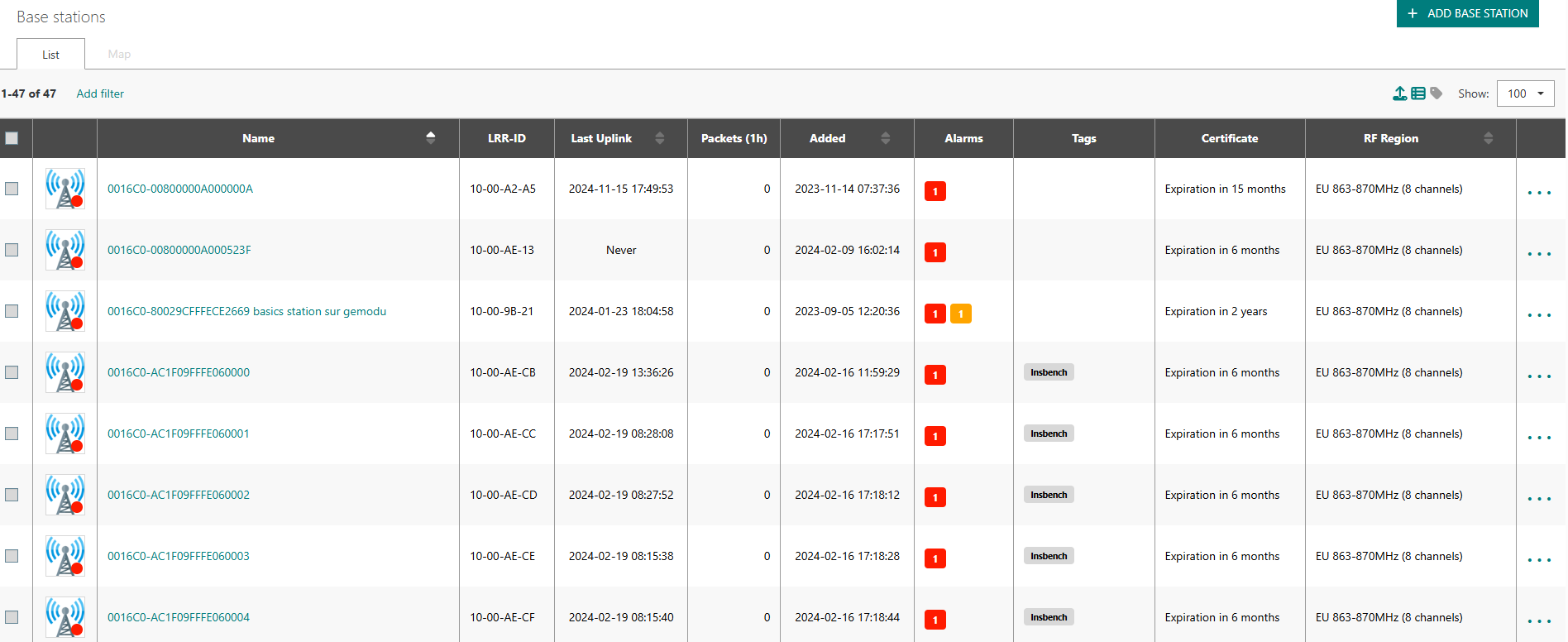
Starting release 8.1, the RF Region of each base station is available as a new column of the list view and is also present in the exportable csv file.
More details
Key customer benefits
Enhanced UI/UX, allowing base station managers to easily audit the RF Region setting of their base stations and quickly identify any potential misconfiguration.
This feature may be particularly interesting for deployments involving multiple ISM bands or deployments having a mix of 8-channel and 16-channel base stations.
Feature activation
The new column is hidden by default to limit the table size. To show the RF Region column, the user should tick the RF Region checkbox as illustrated below:
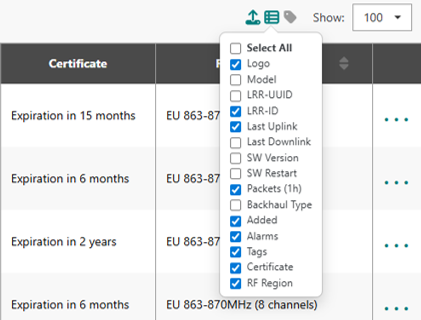
The choice of columns to display is stored in the browser cache so the user does not need to set their preference again every time they login.
Feature limitations
Not applicable.
Display the remaining device/BS license in the Dashboard RDTP-21133
To allow non-administrators to know how many device and/or base station credits are still left in the current license, the count of remaining devices and base stations is now displayed in the main Dashboard, as illustrated by the following example:

More details
Support downlink packet repetition in Multicast mode RDTP-24172
To improve the reception success rate of downlink multicast packets, the Application Server may need to send a given multicast payload several times with the same frame counter.
This capability is possible starting release 8.1, whereby AS may set a new
query parameter repeated in the LRC-AS tunnel interface downlink API.
When repeated =1 in the downlink POST request for a
multicast group, the network server sends the downlink packet with the same frame
counter that was used in the previous transmission to that multicast group.
It is the AS responsibility to repeat multicast frames via individual POST requests, the network server does not autonomously trigger such repetitions.
More details
Key customer benefits
Thanks to this feature, Application Servers sending multicast packets through the LRC-AS tunnel interface can leverage frame repetition to maximize the chances of conveying their payload to end-devices participating to a multicast group. As the different copies of the same multicast payload are associated with the same LoRaWAN frame counter, end-devices shall easily reject duplicate frames.
Feature activation
This feature is automatically available in release 8.1, but multicast repetitions are
disabled by default. The repetition is explicitly requested
by AS by setting the repeated query parameter to 1 (default value = 0).
To learn more about using this feature in LRC-AS tunnel interface API, see Downlink API V2.
Feature limitations
This feature is only supported over the LRC-AS tunnel interface V2 API: sending downlink multicast packets from the user interface or via TPX IoT Flow connections does not currently support repetitions.
[LoRaWAN Relays] Add configuration and monitoring capabilities RDTP-24198
This feature brings the following enhancements to ThingPark users operating LoRaWAN relays:
- Ability to easily identify and filter devices acting as LoRaWAN relays
- Ability to configure LoRaWAN relays: activate/deactivate the relay mode, change WOR parameters, add filtering rules or modify the traffic forwarding limits
- Ability to view the list of trusted end-devices served by each relay.
To learn more, see Operating LoRaWAN relays.
More details
Key customer benefits
- Enhanced operability for LoRaWAN relays: easily identified in the device list and from the map view, new filter criterion, display of the served devices of each relay etc.
- Thanks to the enhanced configuration options of the relay, device managers may now define additional forwarding limits to optimize the relay battery.
- Standard compliance, supporting the following MAC commands besides those supported from
previous releases:
RelayConfReq,FilterListReqandConfigureFwdLimitReq.
Feature activation
The implementation of this feature is backward compatible with relays deployed in previous ThingPark releases: those relays continue to serve underlying end-devices by forwarding LoRaWAN traffic between those devices and the network.
Nevertheless, the new functions brought by this feature (configuration, filtering and monitoring enhancements) are not available until the relay is associated with a device model that explicitly indicates the support of the relay capability. Therefore, to unlock the new feature, update the device model of your existing relays to a profile allowing the relay capability.
Feature limitations
The following limitations exist in release 8.1:
- The MAC command
EndDeviceConfReqis not yet supported in the current release, but all the other MAC commands specified in TS011 are supported. - Only the default WOR channel is supported, since the MAC command required to configure a second WOR channel on the end-device is not yet supported in this release.
Default activation of the device alarm “No uplink activity” RDTP-23893
In many cases, device managers forget to activate the device alarm "No uplink activity", by configuring its settings as explained in Configuring the "No uplink activity" alarm.
-
This alarm notifies the device manager about unexpected connection issues, either caused by a device disfunction, radio problems or configuration issues.
noteThe alarm is not raised if the device is suspended or has never communicated with the network in the past.
-
Additionally, the system relies on these alarm settings to switch the device to the "Connection error" state. If these alarm thresholds are not set, the device may appear active although it has stopped communicating with the network since quite some time.
To mitigate this risk of misleading device health state and allow device managers to be easily notified about device inactivity situations, the alarm thresholds are now set to the following default values:

More details
The device manager may still customize these default settings for each device, as described in Configuring the "No uplink activity" alarm.
This feature does not impact devices for which the alarm thresholds are already set by the device manager in prior releases. The user configuration remains applicable.
Key customer benefits
More comprehensive device states and enhanced notification in case of connectivity issues.
Feature activation
If the device alarm 004 "No uplink activity" has not been activated before the upgrade to ThingPark 8.1, it will be automatically activated after the upgrade, with the following default configuration:
- Raise an alarm with warning severity in case of 7 days of inactivity
- Raise an alarm with major severity in case of 15 days of inactivity
Accordingly, alarms will be automatically raised for inactive devices, including old devices that stopped
communicating with the network, for instance due to dead battery, without being deleted from ThingPark.
Triggering this alarm could be a good occasion to cleanup your device list and remove obsolete devices.
Feature limitations
Not applicable.
Support additional display metrics of the device marker on the map RDTP-19951
Instead of only representing devices on the map according to their health state, this feature allows users to choose the displayed metric from the following list:

A legend is displayed in the bottom left corner of the map to explain the color logic, showing each color alongside its label.
More details
Key customer benefits
Enhanced user experience using ThingPark maps, allowing users to quickly identify geographic spots where radio quality is bad: for instance, high packet error rate (PER) or low average signal to noise ratio (SNR).
Feature activation
This feature is automatically available in release 8.1, but the display is set to "Health state" by default.
Users may change the display metric by clicking the marker icon at the top-right corner of the device map tab.
Once changed, the user preference is stored in the browser cache.
Feature limitations
Not applicable.