Basic connection
Overview
The Core Network (LRC servers) implements a tunnel mode interface. It is a simple message-passing interface between the ThingPark platform which implement the network MAC layer (LRC servers) and application servers.
Two APIs are available:
Connection types
Two types of connection are available for the tunneling interface:
- Basic HTTPS: HTTPS is used for reports from the LRC cluster to the Application Server and for downlink packets from the Application Server to the LRC cluster. See Adding a basic HTTPS connection for more details.
- Basic MQTT: MQTT is used for reports from the LRC cluster to the Application Server and for downlink packets from the Application Server to the LRC cluster. See Adding a basic MQTT connection for more details.
Basic HTTPS
The tunneling interface is based on HTTPS for reports from the LRC cluster to the Application Server and for downlink packets from the Application Server to the LRC cluster.
The destination URLs of the LRC reports are defined for each device in the configuration of the connection. For LoRaWAN® devices, port-based routing can be enabled to route payloads according to their FPort value.
There are two routing strategies toward the destination URLs:
- Sequential: attempt the routing in the defined order of the URLs and stop routing to the following URLs once a 2xx response is received from the last attempted URL.
- Blast: messages are always routed to all the configured URLs.
The LRC reports are transmitted in HTTP/POST requests containing query parameters and an XML or JSON payload. Custom HTTP headers may be defined in the configuration of the connection. When defined, custom HTTP headers are included in all HTTP requests transmitted by the LRC.
The confidentiality of the messages is managed by an HTTPS connection:
- The LRC reports HTTPS session is mounted between the LRC cluster and the Application Server.
- The downlink HTTPS session is mounted between the Application Server and the Reverse HTTP proxy in front of the LRC cluster.
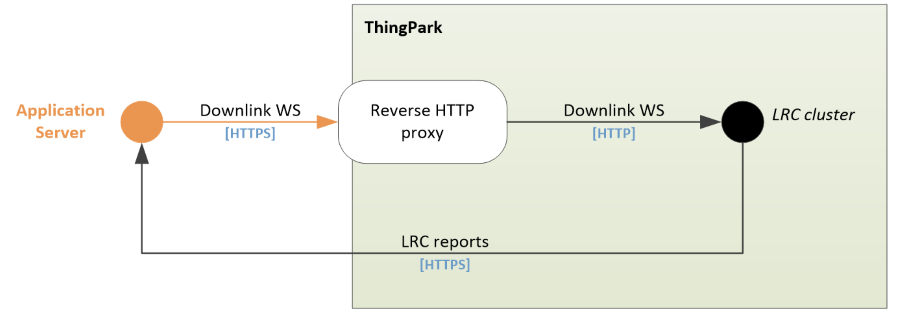
An authentication layer secures the LRC reports and downlink packets. The LRC shares a Tunnel Interface Authentication Key with the Application Server:
- The Application Server uses the Tunnel Interface Authentication Key to generate a signature added to the downlink packets. The LRC uses the signature to verify the identity and the authorization of the Application Server. If the identity or the authorization cannot be verified, the packet is dropped.
- The LRC uses the Tunnel Interface Authentication Key to generate a signature added to the LRC reports. The AS uses the signature to verify the identity of the LRC. If the identity cannot be verified, the Application Server drops the packet.
When the Tunnel Interface Authentication Key is provisioned, its entropy is computed by the ThingPark platform using Shannon's algorithm. If the entropy is greater than or equal to the entropy threshold accepted by the ThingPark platform, the Tunnel Interface Authentication Key is accepted. If not, the Tunnel Interface Authentication Key is rejected.
The Application Server must satisfy the following requirements regarding the LRC reports HTTPS session:
- The Application Server must not use a self-signed TLS certificate.
- The Application Server configured in ThingPark application MUST have valid DNS entries, reachable IP addresses and operational HTTP servers. Routes associated with only one destination URL must be configured in Order (also known as Sequential) mode.
- HTTP 1.1 is designed to allow pipelining of many requests over a single TCP connection. This feature allows avoiding the latency of TCP SYN/SYN ACK exchange during TCP session setup and therefore lower the perceived request roundtrip, and also allows to minimize the TLS overhead as the CPU intensive key negotiation happens only during TCP setup. Unfortunately, recent HTTP servers come with default configurations that tend to optimize response to large numbers of clients, and force TCP disconnect after 5 to 15 seconds. This default setup is way too short for an IoT Application Server as it causes TLS full negotiation to happen for each received packet, if the uplink packet interval to Application Server is greater than 5 seconds. All HTTP servers and proxies used as Application Server for IoT LPWAN networks MUST be configured with a value of at least 30 minutes.
- The AS SHALL send the HTTP response as soon as the HTTP request is processed at the HTTP layer (typically in less than 100ms). The AS SHALL NOT block the transmission of the HTTP response for processing the backend message at the higher layers. Asynchronous processing of HTTP requests MUST be implemented to guarantee this maximum delay. The LRC cluster implements a blacklist procedure based on the number of pending HTTP requests per Application Server. In case the number of pending HTTP requests is too high, the Application Server is blacklisted for 30 seconds.
Basic MQTT
The tunneling interface is based on MQTT for reports from the LRC cluster to the Application Server and for downlink packets from the Application Server to the LRC cluster. Device payloads are exchanged in encoded format without the support of payload drivers.
Two MQTT broker configurations are supported:
External MQTT Broker
When an external MQTT broker is used, the MQTT broker is managed by the customer. No constraints apply to MQTT topic names.
The uplink topic name can contain the following variables, which are replaced with actual values when a message is published:
{DevEUI}: replaced with the device EUI.{DeviceTopicPath}: replaced with the device topic path.
The customer must configure ACLs on the MQTT broker for the LRC MQTT client to:
- Allow publish on uplink topics.
- Allow subscribe on downlink topics.
ThingPark-Hosted MQTT Broker
When the ThingPark-hosted MQTT broker is used, the MQTT broker is managed by ThingPark and is only available on ThingPark SaaS. MQTT topic names are auto-generated and provided in the configuration of the connection.
For now, this ThingPark-hosted MQTT broker is only accessible
for customers using the EU2 platform (hostname thingparkenterprise.eu2.actility.com).
ACLs are configured on the ThingPark-hosted MQTT broker to allow access to these topics.
To connect to the ThingPark-hosted MQTT broker:
- The MQTT client must connect to
mq.eu2.thingpark.com:8883. - Username and password authentication must be used, using a subscriber's service account:
- The client ID must be used as username.
- The client secret must be used as password.
- The service account must have the Device, Multicast Group and Connections manager role.
- To receive uplink messages, the MQTT client must subscribe to the Uplink topic provided in the configuration of the connection.
- To send downlink messages, the MQTT client must publish to the Downlink topic provided in the configuration of the connection.
Parameter Format
ISO 8601 Timestamps
Timestamps Description
All ISO 8601 timestamps parameters described in this section are mandatory and use the following convention:
YYYY-MM-DDThh:mm:ss.s+\|-hh:mm
Examples:
2016-08-01T09:06:06.0+02:00
2016-11-28T09:06:06.0-04:00
Where:
YYYY: four-digit yearMM: two-digit monthDD:two-digit dayhh: two-digit hours (00 through 23)mm: two-digit minutes (00 through 59)ss: two-digit seconds (00 through 59)s: one to three-digit milliseconds (0 through 999)+|-hh:mm: time zone designator (+hh:mmor-hh:mm)
Timestamp Encoding
The timestamp parameter has to be encoded differently in the SHA256 performed during Authentication and in the URL of the HTTP request:
| Special Characters | In SHA256, use... | In URL, use... |
|---|---|---|
+ | + | %2B |
- | - | - |
: | : | %3A |
. | . | . |
| Examples | 2016-08-01T09:06:06.0+02:002016-11-28T09:06:06.0-04:00 | 2016-08-01T09%3A06%3A06.0%2B02%3A002016-11-28T09%3A06%3A06.0-04%3A00 |
Authentication
LRC to Application Server Tunnel Interface
This section describes the authentication of the LRC reports when Basic HTTPS connection type is used. This section is not applicable when Basic MQTT connection type is used.
Securing LRC to AS Frame Principles
Securing LRC to AS frame is implemented in four steps:
-
The LRC adds the AS ID and the generation timestamp in the message.
-
Then, the LRC adds a security token to sign the message based on a pre-shared Tunnel Interface Authentication Key.
-
When the AS receives a message, the AS re-computes the security token.
-
If the re-computed security token matches the security token provided by the LRC, and if the time deviation (between the generation by the LRC and the reception by the AS) is acceptable (e.g. less than 10 seconds), then the AS can trust the message and process it accordingly.
The AS ID and the Tunnel Interface Authentication Key are part of the configuration of the connection associated to the device.
For more information about the Tunnel Interface Authentication Key, see Connection types.
Token Verification Details
The token must be verified by the Application Server as follows:
-
The application server retrieves the decoded query parameters provided by the LRC in the URL of the HTTP request WITHOUT the
Tokenbut including all other parameters in the same order than in the URL:-
For an uplink frame
An example of
<query-parameters>is:LrnDevEui=FADE8F83D9663F5B&LrnFPort=2&LrnInfos=HTTP_RP_2ea666f7-1-1170211&AS_ID=MYASSEC&Time=2022-01-04T10:43:49.185+01:00 -
For a downlink frame sent report
An example of
<query-parameters>is:LrnDevEui=FADE55B9F72E2243&LrnFPort=8&LrnInfos=HTTP_RP_0dac70c1-1-1170317&AS_ID=AS&Time=2022-01-04T10:45:04.793+01:00 -
For a multicast summary report
An example of
<query-parameters>is:LrnDevEui=faded697a91154b7&LrnFPort=1&LrnInfos=HTTP_RP_c837e2b2-1-1170440&AS_ID=AS&Time=2022-01-04T10:46:47.790+01:00 -
For a location report
An example of
<query-parameters>is:LrnDevEui=fadec8b7fce3e6fb&LrnFPort=0&LrnInfos=HTTP_RP_91cb736f-1-1170828&AS_ID=AS&Time=2022-01-04T10:54:32.380+01:00 -
For a notification report
An example of
<query-parameters>is:LrnDevEui=faded5d619611575&LrnInfos=HTTP_RP_839dcea2-1-1170548&AS_ID=AS&Time=2022-01-04T10:48:35.630+01:00
-
-
The application server builds the
<body-elements>as the concatenation, without separator, of the following values:-
For an uplink frame (extract from the
DevEUI_uplinkbody):CustomerID,DevEUI,FPort,FCntUp,payload_hexAn example of
<body-elements>is199906997FADE8F83D9663F5B23a0b2(concatenation of199906997,FADE8F83D9663F5B,2,3,a0b2)CautionA
FPortvalue0is used if noFPortis set in theDevEUI_uplinkbody. An emptypayload_hexvalue is used if nopayload_hexis set in theDevEUI_uplinkbody. -
For a downlink frame sent report (extracted from the
DevEUI_downlink_sentbody):CustomerID,DevEUI,FPort,FCntDnAn example of
<body-elements>is:199906997FADE55B9F72E224381(concatenation of199906997,FADE55B9F72E2243,8,1) -
For a multicast summary report (extracted from the
DevEUI_multicast_summarybody):CustomerID,DevEUI,FPort,FCntDnAn example of
<body-elements>is:199906997FADED697A91154B714(concatenation of199906997,FADED697A91154B7,1,4) -
For a location report (extracted from the
DevEUI_locationbody):CustomerID,DevEUIAn example of
<body-elements>is:199906997fadec8b7fce3e6fb(concatenation of199906997,fadec8b7fce3e6fb) -
For a notification report (extracted from the
DevEUI_notificationbody):CustomerID,DevEUIAn example of
<body-elements>is:199906997FADED5D619611575(concatenation of199906997,FADED5D619611575)
-
-
The application server computes the
<token>as:SHA-256(<body-elements><query-parameters><TunnelInterfaceAuthenticationKey>)-
For an uplink frame
An example of
<token>is:SHA‑256(199906997FADE8F83D9663F5B23a0b2LrnDevEui=FADE8F83D9663F5B&LrnFPort=2&LrnInfos=HTTP_RP_2ea666f7-1-1170211&AS_ID=MYASSEC&Time=2022-01-04T10:43:49.185+01:000eeb1d3dafc5def386223787062b6b91) -
For a downlink frame sent report
An example of
<token>is:SHA‑256(199906997FADE55B9F72E224381LrnDevEui=FADE55B9F72E2243&LrnFPort=8&LrnInfos=HTTP_RP_0dac70c1-1-1170317&AS_ID=AS&Time=2022-01-04T10:45:04.793+01:000eeb1d3dafc5def386223787062b6b91) -
For a multicast summary report
An example of
<token>is:SHA‑256(199906997FADED697A91154B714LrnDevEui=faded697a91154b7&LrnFPort=1&LrnInfos=HTTP_RP_c837e2b2-1-1170440&AS_ID=AS&Time=2022-01-04T10:46:47.790+01:000eeb1d3dafc5def386223787062b6b91) -
For a location report
An example of
<token>is:SHA‑256(199906997fadec8b7fce3e6fbLrnDevEui=fadec8b7fce3e6fb&LrnFPort=0&LrnInfos=HTTP_RP_91cb736f-1-1170828&AS_ID=AS&Time=2022-01-04T10:54:32.380+01:000eeb1d3dafc5def386223787062b6b91) -
For a notification report
An example of
<token>is:SHA‑256(199906997FADED5D619611575LrnDevEui=faded5d619611575&LrnInfos=HTTP_RP_839dcea2-1-1170548&AS_ID=AS&Time=2022-01-04T10:48:35.630+01:000eeb1d3dafc5def386223787062b6b91)Where:
0eeb1d3dafc5def386223787062b6b91is the 128 bits pre-shared Tunnel Interface Authentication Key (lower case hexadecimal string representation) between the Application Server and the LRC as defined in the Application Server configuration.
-
-
The
<token>is encoded as a hexadecimal string AND can be compared to theTokenquery parameter provided by the LRC in the URL of the HTTP request.-
For an uplink frame
An example of
<token>is:e2f2ed5bfa7033391ef908f2a040ede65659a6e14c156443214beb465055c5f5 -
For a downlink frame sent report
An example of
<token>is:968e7e4815d4ad4bb168d087c56b0c1cd88df43685fd7f65496de51945067a37 -
For a multicast summary report
An example of
<token>is:ed7906635edb764eb8e570315772e24fed3853d0f878474394d405d77b085a1a -
For a location report
An example of
<token>is:1a0bf3f1a7a0538918a87e8120170d8a238156a05ef9bae8b03c42ccc52345f2 -
For a notification report
An example of
<token>is:d159eca541c2a8d5d4bcfd1e17a5870ded99ee511cc8b164cb53df8a0deda063
-
-
Finally, if the token is valid, the application server can verify the deviation between the emission (as provided in the
Timequery parameter) and the reception by the application server.
Application Server to LRC Tunnel Interface
This section describes the authentication of downlink packets when Basic HTTPS connection type is used. This section is not applicable when Basic MQTT connection type is used.
Securing Downlink Frame Principles
Securing downlink frame is implemented with the following requirements.
The AS cannot send downlink POST if:
-
The AS is not in possession of the Tunnel Interface Authentication Key.
-
The AS has not been authorized to send downlink packet to the device.
-
The time between the generation of the request by the AS and the reception of the request by the LRC is too high.
The AS ID, Tunnel Interface Authentication Key and max time deviation are part of the configuration of the connection associated to the device.
For more information about the Tunnel Interface Authentication Key, see Connection types.
Token Computation Details
The token must be computed by the Application Server as follows:
-
The downlink message decoded query parameters (including
AS_IDandTimeparameters) are constructed WITHOUT theToken:An example of
<query-parameters>is:DevEUI=000000000F1D8693&FPort=1&Payload=00&AS_ID=app1.sample.com&Time=2016-01-11T14:28:00.333+02:00where:
2016-01-11T14:28:00.333+02:00contains the+character in the time zone designator of theTimeparameter. -
The
<token>is computed asSHA-256(<query-parameters><LrcAskey>)An example of
<token>is:SHA‑256(DevEUI=000000000F1D8693&FPort=1&Payload=00&AS_ID=app1.sample.com&Time=2016-01-11T14:28:00.333+02:0046ab678cd45df4a4e4b375eacd096acc)where:
46ab678cd45df4a4e4b375eacd096accis the 128 bits pre-shared Tunnel Interface Authentication Key (lower case hexadecimal string representation) between the Application Server and the LRC as defined in the Application Server configuration. where:2016-01-11T14:28:00.333+02:00contains the+character in the time zone designator of theTimeparameter. -
The
<token>is encoded as a hexadecimal string (An example of encoded<token>is:63a4ec6532937c9bcba109a75f731d6dc192c9df662dee56757634a8a6dc3f4c) AND added at the end of the query parameters of the HTTP request URL usingTokenparameter.An example of encoded HTTP request URL is:
https://api.thingpark.com/thingpark/lrc/rest/downlink?DevEUI=000000000F1D8693&FPort=1&Payload=00&AS_ID=app1.sample.com&Time=2016-01-11T14%3A28%3A00.333%2B02%3A00&Token=63a4ec6532937c9bcba109a75f731d6dc192c9df662dee56757634a8a6dc3f4cwhere:
2016-01-11T14%3A28%3A00.333%2B02%3A00contains the%2BASCII code for the+character and the%3AASCII code for the:character.
XML or JSON Encoding
LRC reports use the ThingPark format, available in three flavors:
- JSON: default format.
- JSON untyped: JSON where all property values are encoded as strings.
- XML
By default, LRC reports are encoded in JSON. The format can be set to JSON untyped or XML in the configuration of the connection.