Setting up the BACnet dataflow
The BACnet dataflow allows you to automatically expose the data of your LoRaWAN devices as BACnet objects inside a built-in BACnet server. By default, this server uses the standard UDP multicast port 47808 (BAC0), but you may change the port by connecting to Node-RED, as described in BACnet server configuration.
This dataflow supports three BACnet object types, they may be set as inputs/outputs for uplink/downlink properties respectively:
- Analog Value (noted 'AV') for numeric data,
- Binary Value (noted 'BV') for boolean data,
- Character String Value (noted 'SV') for string data.
The BACnet client may subscribe to server notifications for any BACnet property, through
the Change of Value (CoV) feature. Analog type of properties are associated with a COV increment
attribute allowing the client to determine the notification threshold for each property.
The mapping of LoRaWAN sensor data into BACnet objects is fully automated.
Main steps
The following steps describe how to setup the BACnet dataflow:
-
From the left panel of the user interface, go to Dataflows.
-
In the BACnet tab, activate the BACnet flow if it is not already the case, by clicking ACTIVATE BACNET.
tipYou may show/hide the content of each widget in the BACnet tab, by clicking
 /
/ respectively, near
the widget title.
respectively, near
the widget title. -
In the SETTINGS widget, personalize the BACnet server configuration if needed:
- Device ID: default is 817001.
- Device Name: default is 'TAO-XXXX', where XXXX corresponds to the MAC address of the local base station.
Additionally, you may control the mapping settings of your LoRaWAN devices into BACnet objects:
-
Object name: Each extracted data from LoRaWAN sensors is exposed as a BACnet object whose identifier is constructed using the device's DevEUI (default setting), followed by
:then the property name. You may change the definition of the object identifier to use the sensor's friendly name (which is the device name set in TAO) rather than the DevEUI. -
LoRaWAN metadata: You may freely define which LoRaWAN metadata are exposed as BACnet objects, by activating the related switch in the user interface:
- RSSI is the Received Signal Strength Indicator of each LoRaWAN uplink packet. RSSI measures the overall signal strength within the radio channel's bandwidth, summing up the useful signal, the interference and the background noise. RSSI is expressed in dBm.
- SNR is the Signal to Noise Ratio of each LoRaWAN uplink packet. It provides a reliable estimation of the quality of the uplink reception. SNR is expressed in dB.
- FCntUp is the frame counter of each LoRaWAN uplink packet.
- SpFact is the Spreading Factor of each LoRaWAN uplink packet. SF7 corresponds to the fastest data rate while SF12 corresponds to the slowest data rate.
-
In the OBJECT DEFINITION widget, choose which device models should expose their measurement properties (also called points) as BACnet objects. For more details, see Updating object definition.
-
The OBJECT LIST widget displays the list of BACnet points currently defined in your TAO. To learn more, see Viewing the BACnet object list.
Updating object definition
You must define which devices should expose their measurements over BACnet protocol. If you have not added any object definition, TAO will not expose any BACnet objects for your LoRaWAN sensors.
To simplify the user experience, this definition is not made specifically for each LoRaWAN device: you just need to set it up for each device model of interest, this definition then applies to all the LoRaWAN devices associated with this model.
There are two modes of object definition, depending on the device model:
-
Advanced definition
-
As of TAO v2.7.0, this mode applies to the following device models:
- Enless (all models)
- Watteco (all models)
- Thermokon (all models)
- MClimate Vicki
Native support of other device manufacturers will be progressively added in future releases.
-
In this mode, users must choose which points are exposed on BACnet.
noteYou should define at least one point per selected device model. If a device model is selected without any points, TAO will not expose any BACnet objects for the devices associated with this model.
-
This mode allows sending downlink commands over BACnet protocol. Downlink points use one of the following types: analog values, binary values or string values. To learn more about using BACnet for downlink, see Sending downlink commands with BACnet.
-
-
Basic definition
-
This mode applies to all the LoRaWAN models having a valid payload driver in TAO, but they do not yet support the advanced definition mode.
-
In this mode, users cannot choose which points are exposed on BACnet: all the available measurement points are automatically exposed as BACnet objects. Available points are retrieved from uplink payloads reported by each device. Hence, BACnet objects are created on the fly, when the device starts sending uplink packets.
-
Sending downlink commands over BACnet protocol is not supported in this mode. You may use MQTT for downlink transmission.
-
Use the  button, available at the top-right corner of the OBJECT DEFINITION widget,
to export your current object definition, then import it on other TAO servers without manually defining it each time.
button, available at the top-right corner of the OBJECT DEFINITION widget,
to export your current object definition, then import it on other TAO servers without manually defining it each time.
-
To add definition for a new device model, click ADD OBJECT DEFINITION.
-
Choose a Device model, from the list of models currently used by the devices you already added.
-
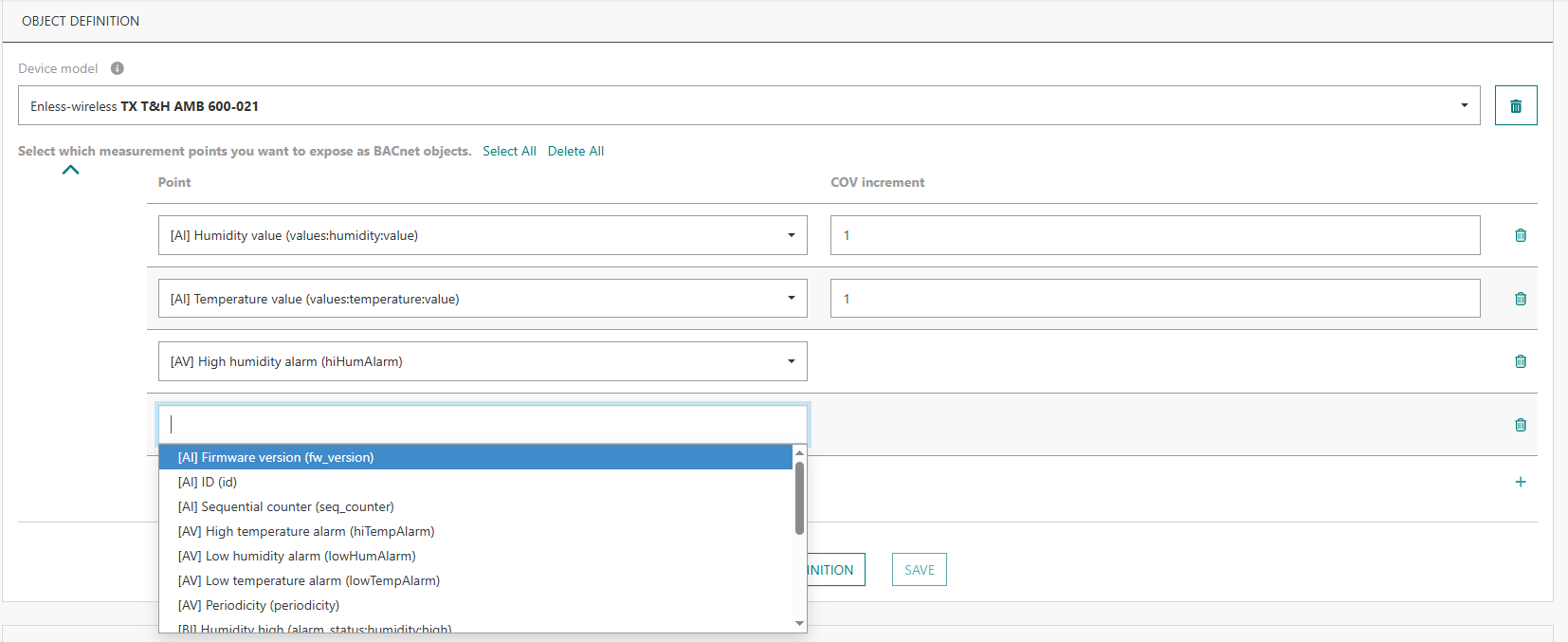
If the model supports the advanced definition mode, you will be asked to select the measurement points that you want to expose as BACnet objects.
Tips- Start typing in the search area to easily find a point.
- Click Select All if you want to add all the points supported by this model.
Then, you may select those that do not want to keep and remove them by clicking
 .
.
Each point is preceded by its type:
- [AI] for analog inputs. For this type, you may set a COV increment threshold, if applicable.
- [AV] for analog values, this type is used for actuated properties having numeric values, settable by sending downlink commands.
- [BI] for binary inputs. COV does not apply to this type.
- [BV] for binary values, this type is used for actuated properties having binary values, settable by sending downlink commands.
- [SV] for string values. This type applies to both uplink and downlink properties. COV does not apply to this type.
-
To add more points, click
 at the bottom-right of the table.
 -
When you are done, click SAVE.
-
At any time, you may update your mapping by clicking EDIT.
Sending downlink commands with BACnet
Sending downlink commands through BACnet is natively supported for all the device models that support the advanced definition mode. See the full list in the previous section.
Downlink commands use the LoRaWAN confirmed mode to ensure reliable delivery to end-devices, they are automatically retransmitted by TAO in case of transmission/reception failure. Up to 5 commands may be concatenated into the same LoRaWAN downlink packet.
For devices supporting the LoRaWAN class C mode, when a downlink actuation command is sent to the device, other commands cannot be sent until the first command is completely processed, either with a positive acknowledgment by the device or when the processing is eventually aborted after 5 transmission attempts without any acknowledgment.
Viewing the BACnet object list
The BACnet object list, showing all the BACnet points with their current value, is displayed in the
OBJECT LIST widget of the BACnet tab.
The timestamp of the last update of each point is also displayed in this list.
"Never" means that the default value of the point is displayed because
the sensor has not yet reported any actual measurement for it.
You may filter this list by device name, device EUI, object name and/or type. Searching in the middle of a string is allowed.
Click at the top-right corner of this widget
to export the list of (filtered) BACnet points.